Blog
CRM vs ERP: Key Differences and Which System Does Your Business Need?
CRM vs ERP
As businesses grow, managing customer relationships, sales activities, finances, inventory, and daily operations becomes increasingly complex. Spreadsheets and disconnected applications may work initially, but they can eventually lead to data duplication, communication gaps, reporting delays, and inefficient workflows.
This is where business management software becomes valuable. Two of the most widely used systems are Customer Relationship Management (CRM) and Enterprise Resource Planning (ERP).
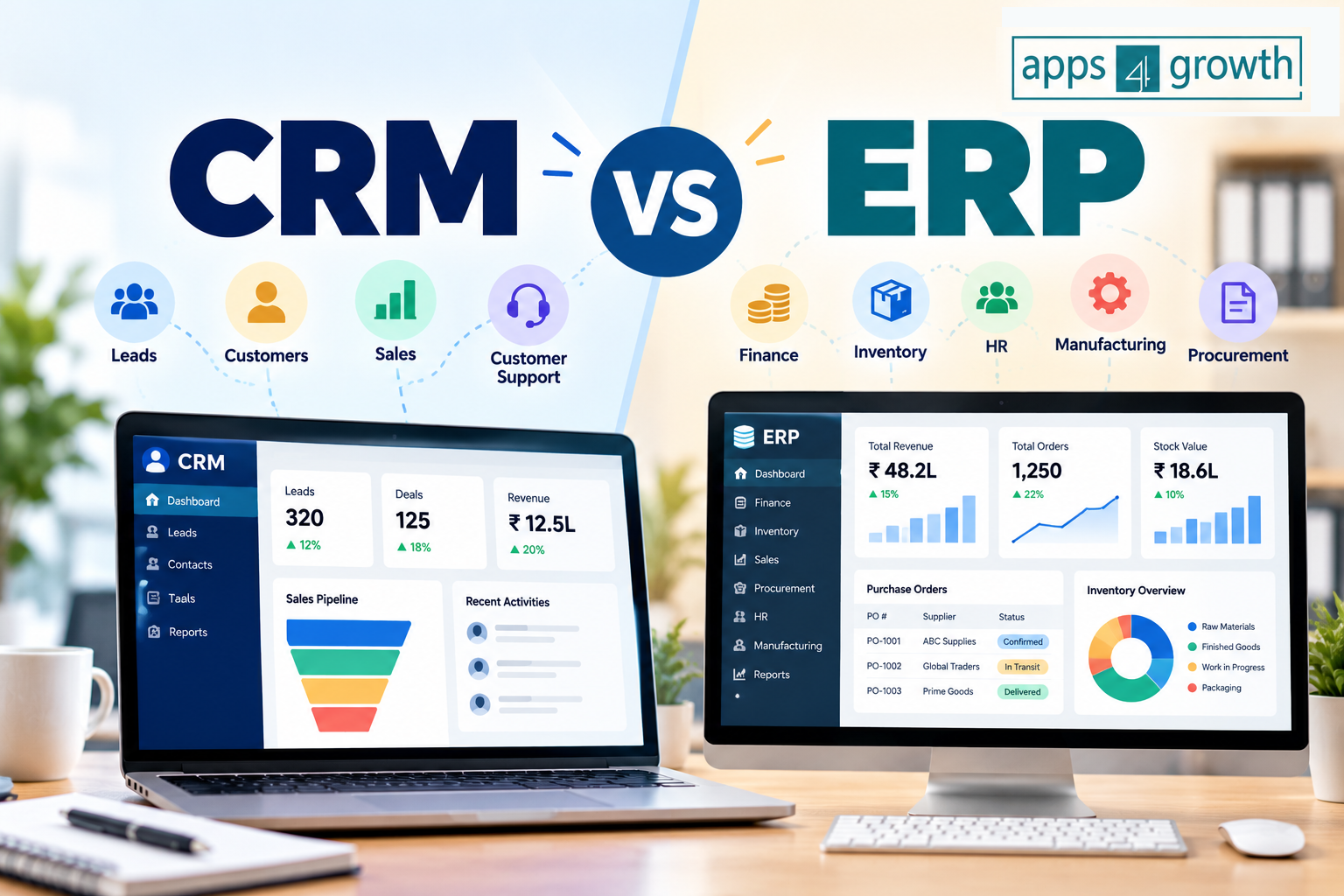
Although CRM and ERP systems both help businesses improve efficiency, they serve different purposes. A CRM system focuses primarily on customers, sales, and relationship management, while an ERP system integrates core business functions such as finance, inventory, procurement, and operations.
Understanding the difference between CRM and ERP can help you choose the right technology for your business, avoid unnecessary software expenses, and build a more efficient operating system.
In this guide, we’ll explain CRM vs. ERP, compare their key differences, explore real-world business scenarios, and help you determine which system your business needs.
What Is CRM Software?
Customer Relationship Management (CRM) software helps businesses manage interactions with current customers and potential buyers throughout the customer lifecycle.
It organizes customer information, tracks sales opportunities, records communication history, and helps teams manage follow-ups and relationships.
Instead of storing customer details across multiple spreadsheets, emails, and messaging applications, businesses can maintain a centralized record of customer interactions.
Key Features of CRM Software
Common CRM features include:
- Contact management: Store customer details, preferences, and communication history.
- Lead management: Capture, organize, and qualify potential customers.
- Sales pipeline management: Track opportunities from initial inquiry to closing.
- Marketing automation: Support email campaigns, lead nurturing, and customer segmentation.
- Customer support: Manage service requests, complaints, and support tickets.
- Sales forecasting: Estimate potential revenue using pipeline information.
- Reporting and analytics: Monitor sales performance, conversion rates, and customer engagement.
- Task and follow-up management: Schedule calls, meetings, and reminders.
Who Should Use CRM Software?
CRM software is particularly useful for businesses that depend on customer acquisition, sales, and ongoing customer relationships.
Examples include:
- Marketing agencies
- Real estate companies
- E-commerce businesses
- SaaS companies
- Consulting firms
- Educational institutions
- Insurance and financial service providers
- Sales-driven small and medium-sized businesses
For example, a real estate company can use CRM software to capture property inquiries, assign leads to sales representatives, schedule site visits, and track prospects until they book a property.
The main objective of CRM is to help businesses understand their customers, improve sales performance, and build stronger relationships.
What Is ERP Software?
Enterprise Resource Planning (ERP) software integrates multiple internal business functions into a coordinated system.
Instead of managing finance, inventory, purchasing, production, and human resources through separate applications, an ERP system connects these functions and enables teams to work with shared business data.
ERP systems are designed to improve visibility, standardize workflows, and coordinate activities across departments.
Key Features of ERP Software
Common ERP capabilities include:
- Financial management: Manage accounting, expenses, budgets, and financial reporting.
- Inventory management: Monitor stock levels, warehouse movements, and product availability.
- Procurement: Manage suppliers, purchase orders, and purchasing workflows.
- Supply chain management: Coordinate sourcing, logistics, and inventory planning.
- Production planning: Support manufacturing schedules, material requirements, and production tracking.
- Human resource management: Maintain employee records, payroll-related workflows, and workforce information where supported.
- Order management: Coordinate orders, fulfillment, and related transactions.
- Business reporting: Generate reports using information from connected departments.
The exact features depend on the ERP product, edition, and modules a business implements.
Who Should Use ERP Software?
ERP systems are especially useful for businesses with complex internal operations, multiple departments, or substantial financial and inventory management requirements.
Examples include:
- Manufacturing companies
- Wholesale distributors
- Retail chains
- Logistics businesses
- Large e-commerce operations
- Construction companies
- Businesses with multiple warehouses or locations
- Growing companies that need integrated financial and operational reporting
For example, a manufacturing company can use ERP software to connect raw material purchases, inventory availability, production schedules, finished goods, customer orders, and financial records.
The main objective of ERP is to help businesses manage resources and coordinate internal operations more effectively.
CRM vs ERP: Key Differences
CRM and ERP systems differ in their primary purpose, users, functionality, and business outcomes.
| Comparison Factor | CRM | ERP |
|---|---|---|
| Full form | Customer Relationship Management | Enterprise Resource Planning |
| Primary purpose | Manage customer relationships and sales | Integrate internal business operations |
| Main focus | Customers and revenue opportunities | Resources, processes, and operational performance |
| Core users | Sales, marketing, and customer support teams | Finance, operations, procurement, HR, and supply chain teams |
| Customer data | Leads, contacts, interactions, and preferences | Customer information associated with orders, billing, and transactions |
| Sales management | Lead tracking, pipelines, and sales forecasting | Order processing and operational coordination |
| Financial management | Usually limited to sales-related information and integrations | Accounting, budgeting, and financial reporting |
| Inventory management | Usually limited or available through integrations | Often a core capability |
| Marketing automation | Commonly supported | Usually not the primary focus |
| Supply chain management | Limited or integration-based | Commonly supported |
| Main business benefit | Better customer engagement and sales visibility | Better operational coordination and resource utilization |
| Typical success metrics | Conversion rate, sales cycle, retention, and customer satisfaction | Inventory accuracy, processing time, operating costs, and financial visibility |
The simplest distinction: CRM helps businesses manage customers and revenue opportunities, while ERP helps manage the resources and processes needed to operate the business.
However, modern platforms sometimes combine these capabilities, so the exact differences depend on the software you choose.
CRM vs ERP: How Do They Work in Practice?
Consider a company that sells office furniture to other businesses.
How CRM Works
When a potential customer submits an inquiry, the CRM system can:
- Capture the lead’s contact information.
- Assign the lead to a salesperson.
- Record calls, emails, and meetings.
- Schedule follow-up reminders.
- Track quotations and sales opportunities.
- Update the opportunity when the customer places an order.
The CRM helps the sales team understand the customer’s requirements and manage the sales process.
How ERP Works
Once an order is confirmed, the ERP system can support the operational steps:
- Record the sales order.
- Check product availability.
- Coordinate procurement if stock is insufficient.
- Schedule order fulfillment.
- Generate invoices through the relevant financial workflow.
- Update inventory and financial records.
- Support delivery and operational reporting.
The ERP helps the company coordinate the activities required to fulfill the order accurately.
What Happens When CRM and ERP Are Integrated?
When both systems are connected, information can flow between sales and operations.
For example, a salesperson may be able to access product availability, order status, or customer billing information from connected ERP data, depending on the integration.
Similarly, the ERP system can receive confirmed order information from the CRM or an associated order management platform.
This reduces duplicate data entry and helps departments work with consistent information.
The exact workflow depends on the capabilities of each system and how the integration is configured.
Benefits of CRM Software
A CRM system can help businesses improve customer-facing processes and sales performance.
1. Better Customer Relationships
A centralized customer record helps employees understand previous conversations, customer needs, and outstanding requests.
Customers are less likely to need to repeat the same information across interactions.
2. Improved Lead Conversion
CRM software helps sales teams prioritize prospects, track opportunities, and follow up at the appropriate time.
This can reduce missed opportunities and improve visibility into the sales pipeline.
3. More Efficient Marketing
Marketing teams can organize contacts into relevant segments and create targeted campaigns based on customer information and engagement.
4. Greater Sales Visibility
Managers can review pipeline value, conversion rates, sales activity, and forecasted revenue to identify opportunities and potential problems.
5. Improved Customer Retention
By tracking customer interactions, service requests, and follow-up activities, businesses can identify customers who may need additional attention.
Benefits of ERP Software
ERP software focuses on improving the coordination and efficiency of internal business processes.
1. Centralized Business Information
An ERP system can connect data from finance, procurement, inventory, and other departments, reducing the need to reconcile disconnected records manually.
2. Better Financial Control
Integrated financial workflows can help businesses monitor expenses, review budgets, and generate more consistent financial reports.
3. Improved Inventory Management
Businesses can track stock movements, inventory levels, and purchasing requirements, helping them make more informed replenishment decisions.
4. Reduced Operational Inefficiencies
Standardized workflows can reduce duplicate data entry, repetitive administrative work, and delays between departments.
5. Better Business Planning
ERP reporting can help managers assess operational performance, resource requirements, and financial outcomes using connected business data.
Can a Business Use Both CRM and ERP?
Yes. Many growing and established businesses use both systems because they address different business needs.
CRM and ERP are not necessarily competing alternatives. They can be complementary parts of a connected business technology stack.
A typical integrated workflow looks like this:
Lead Generation → CRM Lead Management → Sales Opportunity → Confirmed Order → ERP Order Processing → Inventory and Fulfillment → Financial Reporting
The CRM supports customer-facing activities, while the ERP supports the internal processes needed to deliver products or services.
Integration can provide several benefits:
- Reduced duplicate data entry
- Better visibility into order status
- More consistent customer and transaction information
- Improved coordination between sales and operations
- Faster access to relevant business information
- More connected reporting
However, businesses should evaluate integration requirements carefully. Data synchronization, licensing, implementation, security, and ongoing maintenance can add complexity and cost.
CRM vs ERP: Which System Does Your Business Need?
The right choice depends on your biggest operational challenge, business model, current systems, and growth plans.
Choose CRM If Your Main Challenge Is Sales or Customer Management
A CRM system may be the right starting point if your business:
- Receives many leads but struggles to follow up consistently.
- Tracks sales opportunities in spreadsheets.
- Needs better visibility into the sales pipeline.
- Wants to improve marketing campaigns and lead nurturing.
- Has difficulty maintaining customer communication records.
- Needs to improve customer retention or sales reporting.
Example: A digital marketing agency wants to track leads from website forms, schedule discovery calls, manage proposals, and follow up with prospective clients. CRM software would directly address these needs.
Choose ERP If Your Main Challenge Is Internal Operations
An ERP system may be the better choice if your business:
- Struggles to maintain accurate inventory records.
- Manages complex purchasing and supplier workflows.
- Needs integrated financial reporting.
- Operates manufacturing or distribution processes.
- Uses separate systems across multiple departments.
- Needs better coordination between orders, inventory, procurement, and accounting.
Example: A wholesale distributor manages stock across several warehouses and struggles to coordinate purchasing, orders, invoicing, and inventory reporting. An ERP system could help integrate these processes.
Choose Both If Your Business Needs End-to-End Integration
Consider both systems if your business has substantial customer-facing and operational requirements.
For example, a growing e-commerce company may need CRM software to manage customer engagement and marketing campaigns while using ERP software to manage inventory, procurement, accounting, and fulfillment.
In this case, integrating the systems can help connect customer demand with operational execution.
CRM vs ERP for Small Businesses
Small businesses do not always need a full-scale ERP or separate CRM system immediately.
The best approach is to identify the processes creating the most friction and invest accordingly.
| Business situation | Recommended starting point |
|---|---|
| Leads are being missed | CRM |
| Sales follow-ups are inconsistent | CRM |
| Customer communication is scattered | CRM |
| Stock records are frequently inaccurate | Inventory software or ERP |
| Financial reports require extensive manual reconciliation | Accounting software or ERP, depending on complexity |
| Purchasing and warehouse operations are difficult to coordinate | ERP |
| Sales, orders, inventory, and accounting need to work together | Integrated CRM and ERP, or a suitable unified platform |
A small service business may benefit more from a straightforward CRM than a complex ERP implementation.
A small manufacturer, on the other hand, may need inventory, procurement, production, and financial controls before investing heavily in advanced sales automation.
Start with the business problem rather than the size of the software package.
Popular CRM and ERP Software Examples
Several software providers offer CRM and ERP solutions. Some specialize in one category, while others offer multiple connected products.
Popular CRM Solutions
- Salesforce: CRM capabilities for sales, customer service, marketing, and related workflows.
- HubSpot CRM: Customer relationship management with sales, marketing, and service capabilities.
- Zoho CRM: Sales automation, contact management, pipeline tracking, and reporting.
- Pipedrive: Sales pipeline management and sales-focused workflows.
- Freshsales: Sales CRM capabilities with customer communication and automation features.
Popular ERP Solutions
- SAP S/4HANA: Enterprise resource planning for complex business operations.
- Oracle Fusion Cloud ERP: Cloud-based financial and operational management applications.
- Microsoft Dynamics 365 Business Central: Business management capabilities for small and medium-sized organizations.
- NetSuite ERP: Cloud-based business management with financial and operational capabilities.
- Odoo: Modular business applications covering areas such as accounting, inventory, sales, and CRM.
These are examples rather than universal recommendations. Features, pricing, availability, implementation requirements, and suitability vary by edition, region, and business needs.
Before choosing a product, compare current plans, integrations, implementation costs, support, data migration requirements, and scalability.
Factors to Consider Before Choosing CRM or ERP
Selecting software based only on popularity or the number of features can result in unnecessary expenses.
Evaluate the following factors before making a decision.
1. Business Requirements
List the specific problems you want to solve. Prioritize your most important workflows rather than purchasing features you may never use.
2. Total Cost of Ownership
Consider more than the subscription price. Include implementation, customization, integrations, training, data migration, support, and maintenance.
3. Ease of Use
Software that employees find difficult to use may experience poor adoption. Choose a system that fits the team’s skills and workflows.
4. Integration Capabilities
Check whether the system connects with your existing accounting software, website, e-commerce platform, communication tools, and other essential applications.
5. Scalability
Consider whether the software can support future growth, additional users, new locations, higher transaction volumes, or more complex workflows.
6. Security and Access Controls
Evaluate permissions, authentication, audit trails, backup arrangements, data handling, and any regulatory requirements relevant to your industry.
7. Reporting and Analytics
Make sure the software provides the reports and dashboards your team needs to make informed decisions.
8. Implementation and Support
Assess the vendor’s documentation, onboarding, support options, implementation partners, and expected deployment timeline.
Common Mistakes to Avoid
Businesses can waste time and money when selecting or implementing CRM and ERP systems without a clear plan.
Avoid these common mistakes:
- Buying too many features: Choose capabilities that address actual business needs.
- Ignoring employee training: Provide practical training and clear workflows.
- Migrating inaccurate data: Clean and validate records before importing them.
- Overlooking integrations: Confirm that important systems can exchange information reliably.
- Automating inefficient processes: Simplify workflows before configuring automation.
- Underestimating implementation costs: Budget for setup, customization, support, and ongoing maintenance.
- Expecting immediate results: Define realistic goals and monitor adoption and performance over time.
A successful implementation requires clear ownership, realistic expectations, and regular evaluation.
The Future of CRM and ERP: AI and Automation
Artificial intelligence and workflow automation are expanding the capabilities of both CRM and ERP systems.
In CRM software, AI can help summarize customer conversations, suggest follow-up actions, prioritize leads, and assist with customer support.
In ERP software, AI-enabled features can help analyze operational data, identify unusual transactions, support demand forecasting, and assist with document processing.
Automation can also connect actions across systems. For example, a confirmed order may trigger inventory checks, fulfillment tasks, customer notifications, and financial workflows.
However, AI-generated recommendations and automated actions still require appropriate permissions, data quality, monitoring, and human oversight, especially when financial or sensitive customer information is involved.
Businesses should evaluate AI features based on measurable value, reliability, security, and compatibility with existing processes.
Final Verdict: CRM vs ERP
CRM and ERP software serve different but complementary purposes.
CRM is generally the better choice for managing customer relationships, sales pipelines, marketing activities, and customer engagement. ERP is generally the better choice for integrating finance, inventory, procurement, production, and other internal operations.
Choose CRM software if your primary goal is to attract new customers, strengthen relationships, and improve customer retention. ERP software is a better fit for businesses that need to manage inventory, finances, resources, and internal operations more efficiently. Organizations looking to connect sales activities with back-office functions can benefit from integrating both systems or adopting a unified platform that supports their requirements.
Ultimately, the best system is not the one with the most features. It is the one that solves your most important business problems, fits your budget, and supports your long-term growth.
Frequently Asked Questions
1. What is the main difference between CRM and ERP?
CRM focuses on customer relationships, sales, marketing, and customer service. ERP focuses on integrating internal business processes such as finance, inventory, procurement, and operations.
2. Is CRM part of ERP?
Not always. CRM and ERP are often separate systems, although some business platforms provide both capabilities. The available features depend on the product and its configuration.
3. Which is better: CRM or ERP?
Neither is universally better. CRM is more suitable for customer and sales management, while ERP is more suitable for integrated operational and resource management. The right choice depends on your business requirements.
4. Can CRM and ERP work together?
Yes. They can exchange relevant information through native integrations, APIs, or integration platforms. This can connect sales activities with order processing, inventory, fulfillment, and financial workflows.
5. Do small businesses need CRM or ERP?
Small businesses should choose based on their most pressing needs. A service business focused on lead generation may benefit from CRM, while a manufacturer or distributor may need ERP or specialized inventory and accounting software.
6. Is ERP more expensive than CRM?
ERP implementations can involve higher costs when they include complex financial, inventory, manufacturing, and supply chain processes. However, costs vary widely by product, number of users, modules, customization, and implementation scope.
7. Can one software replace both CRM and ERP?
Some unified business platforms offer CRM and ERP-like capabilities in one environment. However, a single platform may not provide the depth required for every function. Evaluate each workflow before deciding.
8. How long does CRM or ERP implementation take?
Implementation timelines depend on the system’s complexity, data migration, integrations, customization, employee training, and business readiness. A basic CRM setup may take considerably less time than a multi-department ERP implementation.
9. What is the difference between CRM, ERP, and accounting software?
CRM manages customer relationships and sales activities. ERP integrates multiple business functions, potentially including accounting. Accounting software focuses primarily on financial transactions, bookkeeping, and financial reporting.
10. What should a business evaluate before purchasing CRM or ERP software?
Businesses should assess functional requirements, total cost of ownership, usability, integration options, security, reporting, scalability, vendor support, and implementation requirements.
Make Smarter Software Decisions with Apps4growth
Choosing the right business software can help you streamline operations, improve productivity, and build a stronger foundation for growth.
At Apps4growth, explore useful applications, business tools, and technology insights to help you make informed software decisions.
Discover the right tools for your business and take the next step toward smarter growth.
Visit Apps4growth to explore solutions that help your business work more efficiently.